Information Hub for Linguists
The following list summarizes the recent changes, with more details in a section further down the page. A sequence like 🆕 2025-11-24 marks items that have been recently added. In your browser you can copy this sequence, then use ⌘-F (Mac) or Ctrl-F (Windows) to find all the places it occurs.
- 🆕 2025-11-24
- Current plans are to open the Survey Tool in early December 2025, but only for Digitally Disadvantaged Locales (DDL) submission.
- This includes locales like Kurdish, Yoruba, Zulu, and many others.
- In order to give more time for submission – we will not have a resolution phase for v49, meaning that the survey tool will remain open for new submissions until the next general submission cycle in April 2026.
- This does mean that submissions made between now and April 2026 will NOT be reflected in the v49 data release of CLDR. Instead, they will be included in the v50 release of CLDR, which is scheduled for October 2026.
- Survey Tool submission for v50 for locales maintained by the Technical Committee (TC), such as English, German, French, will open as usual around May 2026.
- Exceptional changes for v49 for TC-maintained locales should be filed as JIRA tickets for TC review and they will be remediated by modifying the XML directly..
- Current plans are to open the Survey Tool in early December 2025, but only for Digitally Disadvantaged Locales (DDL) submission.
When a section below changes, the date will be in the header.
Starting Submission
Before you start Submission, please read the CLDR training (if new to the survey tool). Please prioritize the sections Missing, Provisional, and Errors. Please read the Updates. For more information about the priorities during Submission, see Survey Tool stages.
Prerequisites
- If you’re new to CLDR, take the CLDR training below.
- If you’re already experienced with CLDR, read the Critical reminders section (mandatory).
- Review the Status and Schedule, New Areas, Survey Tool, and Known Issues.
- Once you are ready, go to the Survey Tool and log in.
Status and Schedule
The Survey Tool is currently closed for submission.
Languages which don’t have a value in the Target Level column of the Locale Coverage chart are not TC locales and will open early for data submission in December. DDL locales is the best resource to learn more about DDL locales and how to submit data for them.
The Survey Tool will re-open for the next regular general submission cycle around May of 2026.
- Disconnect error. If you see a persistent Loading error with a disconnect message or other odd behavior, please empty your cache.
- Survey Tool email notification may be going to your spam folder. Check your spam folder regularly.
- “Same as code” errors - when translating codes for items such as languages, regions, scripts, and keys, it is normally an error to select the code itself as the translated name. If the error appears under Typography, you can ignore it.
New languages
We are reviewing new locale requests for inclusion in CLDR 50. See how to add a new locales.
New Areas
TBA - New areas and data will be announced at the start of general submission for CLDR 50.
New emoji
TBA - Section will be updated when Unicode 18 emoji keywords are added to the survey tool for localization
Survey Tool
Once trained and up to speed on Critical reminders (below), log in to the Survey Tool to begin your work.
Survey Tool Changes
- The ability to search in the Survey Tool has been added in CLDR-18423 and supports searching for: values, English value, and for the codes
- There has been substantial performance work that will show up for the first time. If there are performance issues, please file a ticket with a row URL and an explanation for what happened.
- In the Dashboard, you can filter the messages instead of jumping to the first one. In the Dashboard header, each notification category (such as “Missing” or “Abstained”) has a checkbox determining whether it is shown or hidden.
- In each row of the vetting page, there is now a visible icon when there are forum messages at the right side of the English column:
- 👁️🗨️ if there are any open posts
- 💬 if there are posts, but all are closed
- For Units and a few other sections, the Pages have changed to reduce the size on the page to improve performance.
- Pages may be split, and/or retitled
- Rows may move to a different page.
- The symbols in the A column have been changed to be searchable in browsers (with Find in Page) and stand out more on the page. See below for a table. They override the symbols in Survey Tool Guide: Icons.
See Recent changes for additional recent changes in the Survey Tool.
Important Notes
- Some of the Page reorganization may continue.
New Approve Status Icons
| Symbol | Status | Notes |
|---|---|---|
| ✅ | Approved | Enough votes for use in implementations … |
| ☑️ | Contributed | Enough votes for use in implementations … |
| ✖️ | Provisional | Not enough votes for implementations … |
| ❌ | Unconfirmed | Not enough votes for implementations … |
| 🕳️ | Missing | Completely missing |
| ⬆️ | Inherited | Used in combination with ✖️ and ❌ |
Enhanced “Show Hidden”
🆕 2025-05-09 — If a field contains characters that are invisible or certain characters that look like others, a special Show Hidden bar will appear below the field that helps distinguish them. For example, see Example Hidden — here is a screen-shot.
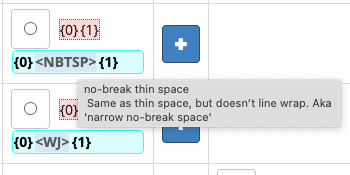
Note that if you hover over the Show Hidden bar, you’ll see the name of the special character and a short description. Some of the commonly used special characters are listed below, with an example from CLDR.
| Symbol | Example | Show Hidden | Name | Description |
|---|---|---|---|---|
| ❰NDASH❱ | {0}–{1} | {0}❰NDASH❱{1} | En dash | Slightly wider than a hyphen; used for ranges of numbers and dates in many languages; for clarity may have ❰TSP❱s around it. |
| ❰TSP❱ | d – d | d❰TSP❱❰NDASH❱❰TSP❱d | Thin space | A space character that is narrower (in most fonts) than the regular one. |
| ❰NB❱ | {0}{1} | {0}❰NB❱{1} | No Break | An invisible character that doesn’t allow linebreaks on either side; also limits fraction super/subscripting |
| ❰NBTSP❱ | h a | h❰NBTSP❱a | No-break thin space | A thin space that disallows linebreaks; equivalent to ❰TSP❱❰NB❱ |
| ❰NBSP❱ | re call | ❰NBTSP❱ | No-break space | A regular space that disallows linebreaks; equivalent to adding ❰NB❱ after a space |
| ❰NBHY❱ | re‑call | re❰NBHY❱fine | No-break hyphen | A regular hyphen that disallows linebreaks; equivalent to -❰NB❱ |
The BIDI controls — ❰ALM❱ ❰LRM❱ ❰RLM❱ are used in bidirectional scripts (Arabic, Hebrew, etc.) to control the bidirectional order if needed; typically next to numbers or punctuation.
To see how to input these from the keyboard, and for a key to all the escapes, see Key for Show Hidden.
Known Issues
Last updated: 2025-12-12
This list will be updated as fixes are made available in Survey Tool Production. If you find a problem, please file a ticket, but please review this list first to avoid creating duplicate tickets.
- CLDR-18689 - Languages are sorted by full English name instead of core element, and may appear on different pages in Locale Display Names
- CLDR-18577 - If your language does not have a variant value, you can vote for inheritance from the standard version.
- CLDR-13477 - Images for the plain symbols. Non-emoji such as €, √, », ¹, §, … do not have images in the Info Panel. Workaround: Look at the Code column; unlike the new emoji, your browser should display them there.
- CLDR-17683 - Some items are not able to be flagged for TC review. This is being investigated. Meanwhile, Please enter forum posts meanwhile with any comments.
Resolved Issues
Last updated: 2025-12-12
- CLDR-18615 - Unclear error message if a link sends you to a page that no longer exists in the Survey Tool
- CLDR-18607 - Unable to download current votes in CSV
- CLDR-17829 - Some links in the Info panel not displaying properly
CLDR training (for new linguists)
Before getting started to contribute data in CLDR, and jumping in to using the Survey Tool, it is important that you understand the CLDR process & take the CLDR training. It takes about 2-3 hours to complete the training.
- Understand the basics about the CLDR process read the Survey Tool Guide and an overview of the Survey Tool Stages.
- New: A video is available which shows how to login and begin contributing data for your locale.
- Read the Getting Started topics on the Information Hub:
*If you (individual or your organization) have not established a connection with the CLDR technical committee, start with Survey Tool Accounts.
Critical reminders (for all linguists)
You’re already familiar with the CLDR process, but do keep the following in mind:
- Aim at commonly used language - CLDR should reflect common-usage standards not academic /official standards (unless commonly followed). Keep that perspective in mind.
- Carefully consider changes to existing standards - any change to a value from a previous CLDR release (blue star) should be carefully considered and discussed with your fellow linguists in the CLDR Forum. Remember your change will be reflected across thousands of online products — and potentially almost all online users of your language.
- Keep consistency across logical groups - ensure that all related entries are consistent.
If you change the name of a weekday, make sure it’s reflected across all related items.
Check that the order of month and day are consistent in all the date formats, etc.
- Tip: The Reports are a great way to validate consistency across related logical groups, e.g. translations of date formats. Use them to proofread your work for consistency.
- Avoid voting for English - for items that do not work in your language, don’t simply use English. Find a solution that works for your language. For example, if your language doesn’t have a concept of calendar “quarters”, use a translation that describes the concept “three-month period” rather than “quarter-of-a-year”.
- Watch out for complex sections and read the instructions carefully if in doubt:
Tip: The links in the Info Panel will point you to relevant instructions for the entry you’re editing/vetting. Use it if in doubt.